In everyday business, working professionally with images and media files is essential - whether in marketing, PR, sales, or internal communication. That’s why it’s important to manage these digital assets efficiently. This is where image database software comes in, also known as digital asset management (DAM).
Are you already using DAM? Then use the quick check further down to see if your tool is still up to date.
What is image database software and what does it do for your company?
Image database software is a central platform that lets you store, manage, and deliver assets such as images, videos, logos, graphics, and presentations in a targeted way. Instead of messy, fragmented storage, you get a structured, searchable system with smart functionality.
Typical use cases for image database software include:
Why companies need image database software
As your company manages a growing library of images, shared folders and improvised structures reach their limits quickly. Therefore, a professional image database becomes essential.
However, image database software for businesses only pays off if it really fits your needs. It shouldn’t just help you build an image database. It should also be designed for team‑based work and daily collaboration.
Build your own image database with DAM
With image management software, you can set up your own online image database and manage all your digital images there, including assets from free sources such as free image databases, which you can store and categorize centrally.
Unlike simple folder trees on a local drive or basic cloud storage, professional solutions add extra capabilities that help you organize and control your media files in a much more targeted way.
If you’re looking for image database software, a digital asset management (DAM) system is the right choice. A platform like pixx.io covers all the classic image database features and adds tools for team collaboration, AI powered workflows, light image editing, rights management, and automated workflows. That way you can build your own image database quickly and in a structured, scalable way.
7 features that make organizing and archiving images easy
Now let’s have a look at which key features good image database software should offer and how to check whether pixx.io meets your requirements.
Key feature 1: central organization for efficient image management
When you work with your company’s media files, you want a continuous workflow. That means digital images, illustrations, and videos need to be available everywhere and at any time, and they shouldn’t end up buried in someone’s email inbox or messenger history and then be forgotten.
The solution: In a DAM‑based image database, you store media files in their original version and maximum resolution in one central hub, so your team can work with them across departments and locations. The DAM from pixx.io works like an image database and bundles all content from your image and media pool into one central digital mediaspace in the cloud.
The benefits:
Key feature 2: sharing features for secure image exchange
From the photo shoot to the finished brochure or website, images are often passed around like ping‑pong balls. Along the way, both quality and information flow can suffer.
The solution: DAM users share content without detours through their email program internally and externally with photographers, designers, or content managers. Good photo library software provides photos and media files in the desired size with just a few clicks.
You can recognize the best image databases by the fact that they go even further:
Key feature 3: integrations for easy collaboration
To cover the entire workflow from the photo shoot to upload and all the way to the final stop in your image archive in the digital asset management system, the software needs to integrate seamlessly. Otherwise, graphic designers must download photos first and upload them again after editing.
The solution: Plugins and integrations for Adobe Cloud, Microsoft Office, or your content management system are essential. Your image database software should also provide a REST API: this interface connects the system to any third‑party software you use.
Key feature 4: access control and license management for compliance
Which employee has which rights and access to which media and image collections? Which images are allowed to be published? If an image without a valid license goes public, it quickly becomes expensive.
The solution:
Key feature 5: version history for transparency in organization
Accidentally overwriting an image file with a new version? No idea which version is the latest? Without versioning, confusion and errors are part of everyday life.
The solution: Professional image management software stores older image variants in a stack behind the latest file version. In pixx.io, versioning is built in. Users still have access to variants later but can see immediately which versions of the image files are current and those are the ones that count. Versioning across file formats for example, after editing in Illustrator or PowerPoint is no problem either.
Key feature 6: automatic tagging for fast image search
Are your images called IMG_20200291001 or something similar? Then only a good memory will help when you’re looking for the photos from the last photo shoot.
The solution: Keywords make it easier to browse your image collections, while metadata simplifies organizing your files. Many photos and media files have already their own metadata. You assign keywords when you upload your assets into your digital asset management system.
A good DAM tool handles this automatically and lets you edit all information or create new fields for additional metadata. Now you simply search for keywords like “mountains” or product names, and you find what you’re looking for.
Key feature 7: flexible download options for image files
Images are flexible and can be used in different formats and qualities. That’s a benefit until a download suddenly delivers the wrong format.
The solution: Image database software can convert size, format, resolution, and color profile correctly at any time, or let you make individual adjustments. This means you can place your images in their target environment without extra effort even if transparencies are preserved.
How to choose the right image database software
A database for managing image files and media digitally can be incredibly helpful, but if the basics aren’t right, the software creates more work than it saves. So, when you compare DAM‑based image databases, focus on these three aspects.
Usability and Flexibility
New employees shouldn’t have to spend hours learning about the system, and long‑time colleagues shouldn’t need endless checklists just to upload files. The software should be user‑friendly. That includes:
Good image database software gives you full flexibility: whether you prefer folder structures and detailed views or large, visually rich media views. Both should be possible.
The finishing touch is batch processing, like in pixx.io. When you upload similar images, you can assign the same keywords to all files at once or apply changes to multiple media files in a single step.
Security
Your image database software must protect your data and leave no questions unanswered:
Support
For questions about security and all other topics related to your DAM, you should have access to first‑class support. Good providers support you with technical questions, problems, feedback, and feature requests. Documentation in the form of a detailed help center is the cherry on top.
How to switch to the best photo management
pixx.io makes the switch as easy as possible: migrating existing media archives works smoothly, even if your current media pool is still unstructured. If questions come up, the support team is there to help.
If you finally want effortless workflows in your daily work, look at the benefits of pixx.io for modern teams. And if you’d like to know how the DAM‑based image database compares to Dropbox, go straight to the comparison.
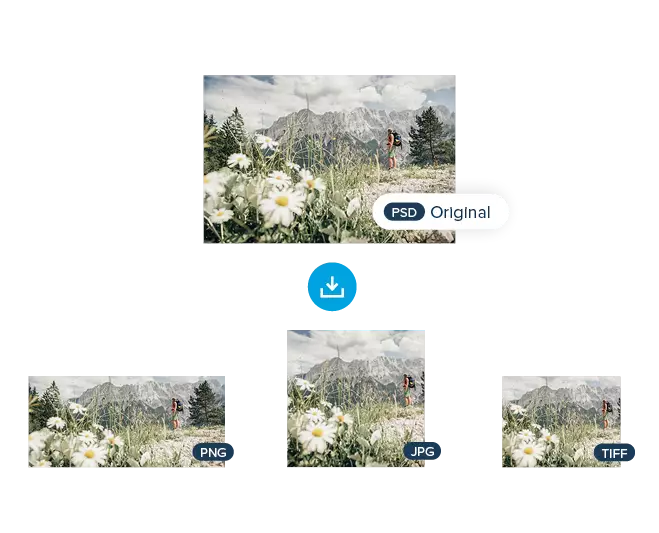 Image downloads in various formats such as PNG, JPG, or TIFF save time
Checklist: Is Your DAM Still Up to Date?
Some companies recognized the benefits of photo management with a digital asset management system early on and have been organizing their files with it for many years.
You’re one of them? Great. But is your software still up to date, or are the first signs of aging already visible? This checklist will help you decide.
⭐ Does your DAM system reduce your workload?
➡️ Are keywords, filters, watermark protection, or share links unfamiliar functions for you?
⭐ Does your DAM offer a strong user experience?
➡️ Learning the system should be as quick as possible, even for new team members.
⭐ Are you free to structure your data the way you want?
➡️ Or does your DAM force you into a rigid framework that limits your work?
⭐ Does your DAM offer status management?
➡️ You didn’t know there was such a thing as status management and status functions?
⭐ Do you have an overview of licenses and contracts?
➡️ Does your DAM let you store licenses, model and property contracts, and releases?
⭐ Can you define rights and roles?
➡️ With modern DAM software, you can adopt logins and permissions from your operating system, such as LDAP and Active Directory.
⭐ Does your DAM integrate seamlessly?
➡️ Does it offer plugins or even a REST API?
⭐ Does your DAM provide versioning?
➡️ Versioning stores older variants in a stack behind the latest version.
⭐ Are performance and search speed still as good as on day one?
➡️ Do you still find your media files as quickly as you did at the beginning?
⭐ Does your provider have a technical roadmap?
➡️ DAM providers with a detailed technical roadmap regularly develop new features and improve existing ones. That makes it easy to adopt trends such as AI‑based tagging.
If your answer to most of these questions is “yes”, your DAM is still up to date. Otherwise, you should look for a successor. You can recognize a good provider right away: support is happy to help you move your entire digital media pool because of course such a migration involves some effort.
Sabrina
Sabrina writes for pixx.io about everything that concerns you in your day-to-day work and helps you to overcome challenges in content and social media marketing, image formats or compliance. When it comes to complex topics, she prepares the knowledge of media and legal experts for you in an understandable way.