Email works for sharing files - up to a certain size limit. Once attachments get too large, many teams turn to WeTransfer. Find out, when WeTransfer is the right tool, where its limits become obvious, and which alternatives offer more control, security, and structure for professional use.
What is WeTransfer?
WeTransfer is a file-hosting service from the Netherlands designed to make sending large files fast and simple. Instead of clogging inboxes with oversized attachments, users upload files via a web interface and share them through a download link.
The process is straightforward: upload files into your browser, generate a transfer link, and optionally send that link directly via email. Anyone with access can download the files to their device.
WeTransfer offers a free plan. Files larger than 3 GB, however, require a paid subscription.
WeTransfer vs. Dropbox: What are the main differences?
Unlike cloud storage services such as Dropbox, WeTransfer is not designed for long-term storage or collaborative file management. Its primary purpose is quick, one-off file transfers not structured file management.
Key advantages of WeTransfer
WeTransfer allows you to:
For these reasons, WeTransfer is attractive to users who need to send a file quickly when its size exceeds email attachment limits. However, WeTransfer also reaches its limits quickly. Especially in professional environments, there is often a need for an all-in-one solution that addresses multiple aspects of file and asset management - not just file transfer.
Why teams look for a WeTransfer alternative
Despite its ease of use, WeTransfer has clear limitations, especially for organizations working with media at scale. The most common reasons teams look for alternatives include:
Limited Functionality: WeTransfer makes it easy to send large files, such as videos or high-resolution images. However, it does not offer features for organizing, editing, reviewing, or approving files.
Disconnected workflows: Because functionality is limited, workflows are limited as well. Files received via WeTransfer are typically downloaded locally and then have to be uploaded manually into other systems for further processing, collaboration, or storage.
No long-term asset management: WeTransfer is designed for file transfer, not for long-term storage. It is not suitable for building or maintaining a structured archive of media files.
For organizations that work with media on a regular basis, these limitations quickly become problematic.
pixx.io as a WeTransfer alternative
Some teams replace WeTransfer with general cloud storage tools such as Dropbox or Google Drive. While these tools offer storage and sharing capabilities, they often raise similar concerns around data protection, access control, and governance as WeTransfer.
A more comprehensive alternative is a digital asset management (DAM) system like pixx.io. A DAM system enables centralized management of images, videos, metadata, licenses, and external sharing links within clearly defined workflows.
Since pixx.io is developed in Bavaria, Germany, all assets are stored on secure servers in Germany. All processes comply with GDPR requirements. Further, pixx.io is ISO 27001 certified by TÜV.
Beyond file transfer: Structured media workflows
In addition to keeping your data secure, pixx.io provides everything you need to simplify working with media files. With WeTransfer, you can send files, and that’s it. With pixx.io, you can also organize, edit, and share your assets, and use them directly within the tools you already work with.
pixx.io offers integrations with tools such as Canva and Adobe Creative Suite. This allows images to be edited and reused more quickly, without unnecessary detours or manual downloads.
Where WeTransfer focuses on delivery, pixx.io supports the entire media lifecycle. Teams can:
This turns individual file transfers into a structured and controlled asset management process.
Sharing files with your team and the world: WeTransfer vs. pixx.io
When looking for an alternative to WeTransfer, one capability is especially important: file sharing.
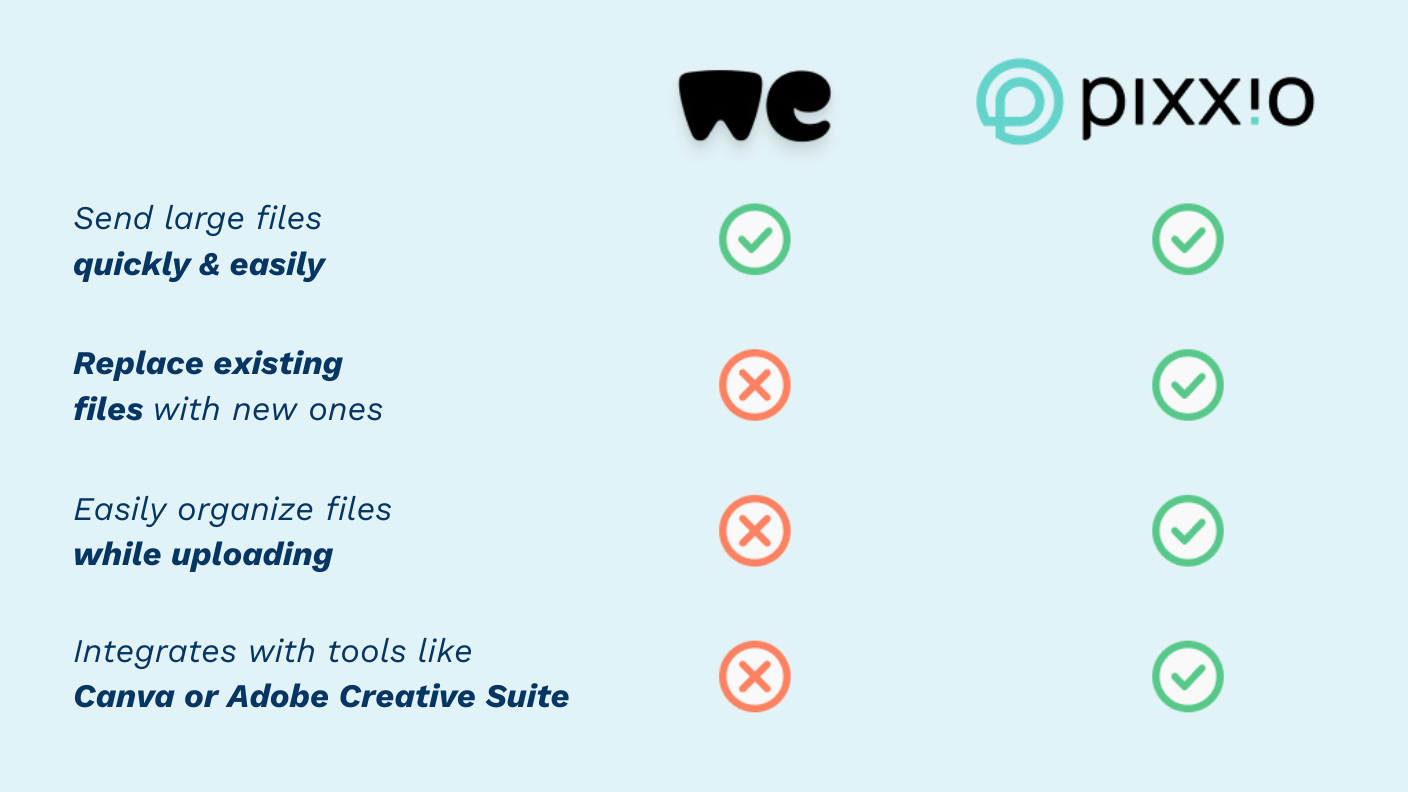 Here’s what pixx.io does in contrast do WeTransfer:
Try pixx.io for yourself
If you want to evaluate whether pixx.io can replace WeTransfer in your workflows, start a free trial and explore your own personalized media space.
Frequently Asked Questions
How does media management work with WeTransfer?
With WeTransfer’s file-hosting service, photos and other media can be uploaded and shared via a download link. However, unlike cloud storage solutions such as Dropbox, the free version does not allow files to be stored for more than a limited time, nor does it support collaborative editing or structured media management.
What advantages does pixx.io offer compared to WeTransfer?
WeTransfer focuses on simple file delivery. pixx.io, on the other hand, allows teams to centrally organize, manage, and collaborate on media assets. Files are stored securely on servers in Germany and shared through controlled workflows that meet GDPR requirements.
Sabrina
Sabrina writes for pixx.io about everything that concerns you in your day-to-day work and helps you to overcome challenges in content and social media marketing, image formats or compliance. When it comes to complex topics, she prepares the knowledge of media and legal experts for you in an understandable way.